The apartment datacenter
One person would need eight arms to keep this running — hence the octopus. The same corner with the lid off: what runs on which box, how eight zones are kept apart, and how a change gets from a branch onto the live system. As of 2026-09-22.
TycStation keeps the smart home, media, websites, secrets and much of the network of one Cologne apartment under local control. 60 cores/72 threads. 39 TB flash. 100 TB spinning rust. 25G. Under one desk. If you just grinned, you get it. Need it? No. Want it? Yes. Why? Yes. The flat keeps working when the internet does not.
The hardware
The constraint that shaped this list is the noise floor. This build grew up in the gap between a desk and a hi-fi tower, and a machine that whines is disqualified before its spec sheet is read. That rules out rackmount chassis and their 40 mm fans whatever they cost per core, and it pushes the whole build toward small, low-wattage machines — heat is what forces fans.
- 2× MS-02 mini-PC — the workhorses: they run the firewalls and most of the guests. 24 cores, 48 GB and 4 TB of NVMe each.
- N5 Pro — the third vote and the drive vault: 100 TB of spinning rust as one encrypted pool that survives any two dead drives, holding the backups and the media archive. 12 cores, 32 GB.
- MikroTik CRS317 — the core switch, the 10G backbone. Every node lands here.
- MikroTik CRS320 — the PoE switch: the desk, the media players and the Zigbee coordinator, and it powers the KVM.
- MikroTik CRS310 — the access switch: 2.5G for the Wi-Fi and the NAS.
- Synology DS1525+ — shared storage and backup target, all flash: 28 TB of SSD.
- UniFi U7 Pro Max — the Wi-Fi, the one piece of UniFi that stayed.
- Comet X (GL-RM4PE) — a remote keyboard and screen for every node; its set-up is still planned.
- Vigor 166 — the modem, on its own power so a firewall failover never waits for it.
- UPS — time for a clean shutdown when the power goes.
Together that is 39 TB of flash — 11 TB of NVMe in the nodes, 24 TB of SATA SSD in the Synology and the 4 TB USB SSD on it — and 100 TB of spinning rust in the N5 Pro.
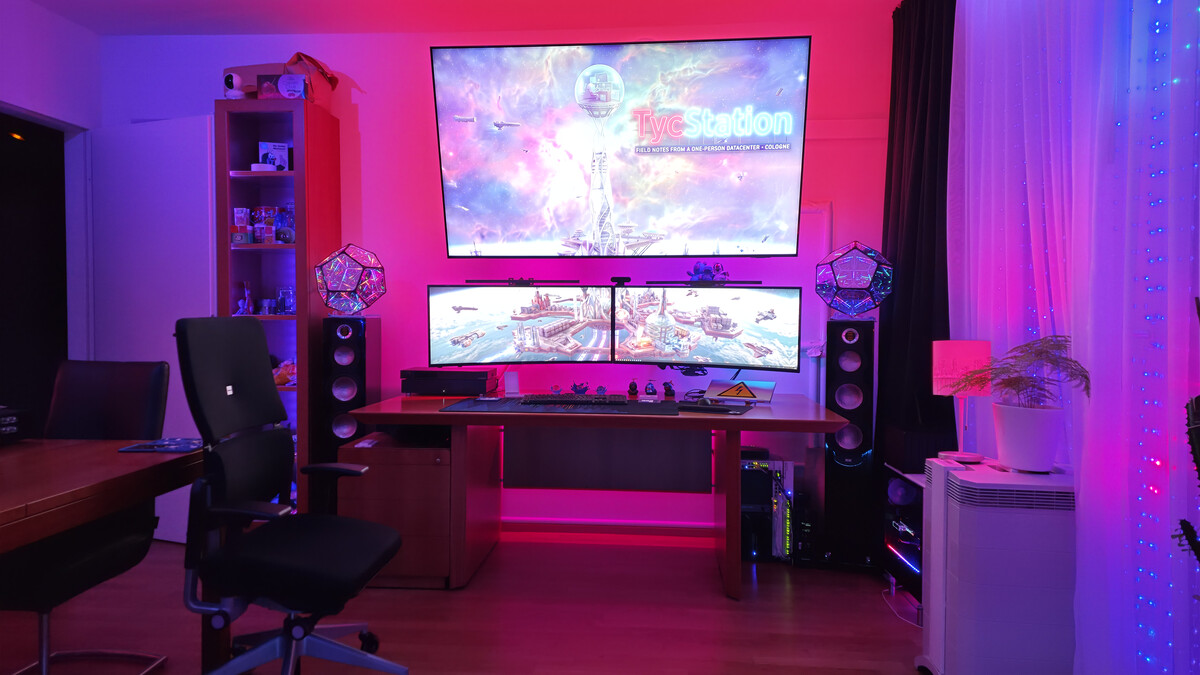
20 September 2026: the room the rack shares. The gear stands under the right end of the desk, next to the hi-fi speaker.
 October 2025, before the rebuild: the original mini rack in that same gap.
 July 2026: the three MikroTik switches arrive and get their first cabling on the desk — the core switch on top, the PoE and access switches beneath.
The switches arrived carrying the same problem in miniature: 40 mm fans, the exact part the noise budget had already ruled out at chassis scale. They were opened on the bench the day they came out of their boxes and refitted with Noctua NF-A4x20 PWM fans — a 40 × 20 mm four-pin part — before any of them was cabled in.
Not a clean swap everywhere. The stock fans differ in depth — the deep ones are 40 × 28 mm, against which the Noctua is eight millimetres short. Same frame, same screws, and eight millimetres of empty housing that cools exactly as well as the air it replaced. The engineer who picked those fans was designing for a room nobody sits in; a living room was not on the datasheet.
 July 2026: both switches open on the day they arrived. The fans sit at the edge of the board, next to the heatsink they are there to cool.
 23 August 2026, the night this page was revised: the fabric is in, mounted vertically in the same gap as before — and not yet fully installed. Cabling and the final mount are still to come.
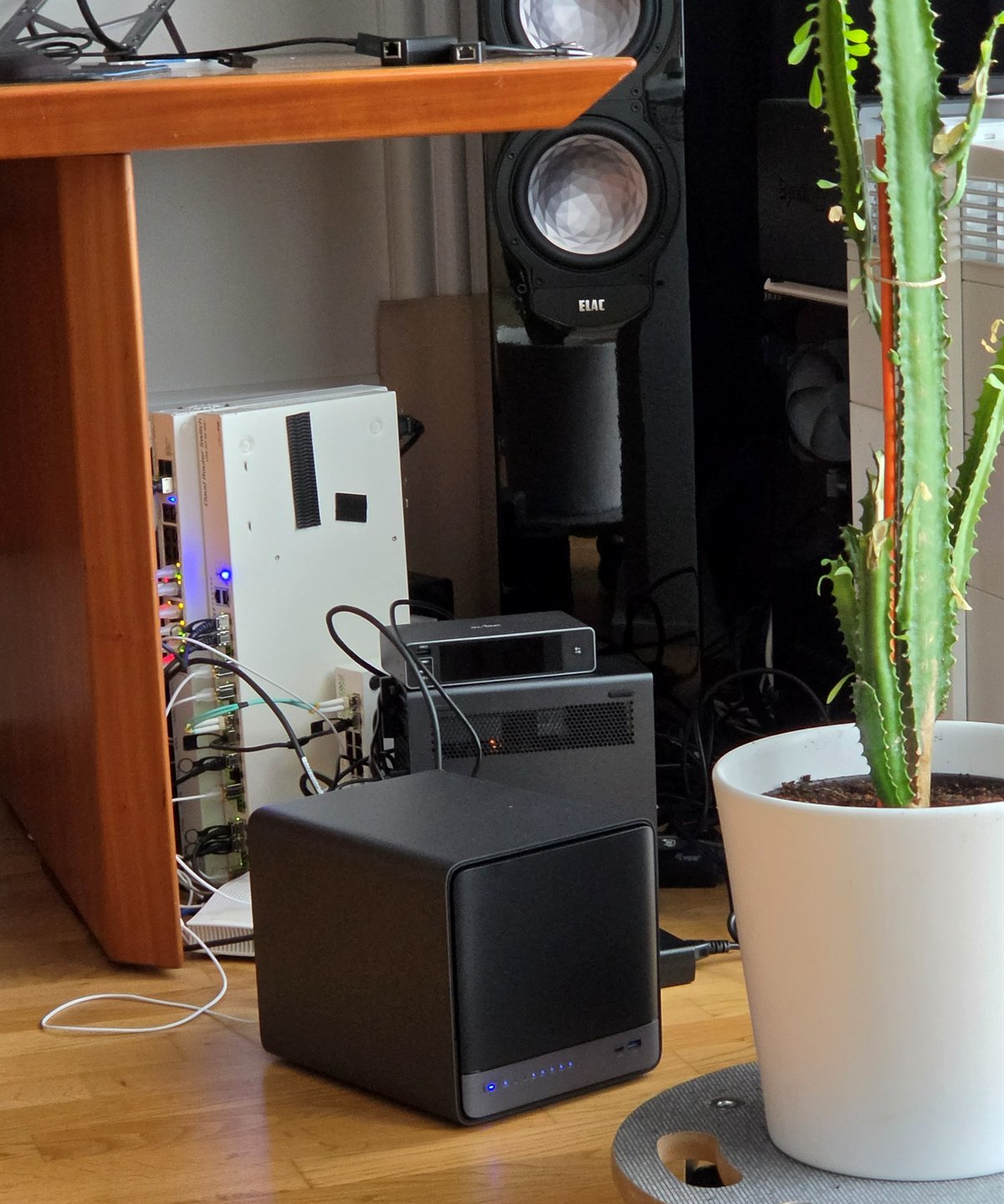 12 September 2026: the third node on the day it joined the cluster — the five-bay box on the floor in front of the switches, its bays lit; its final seat in the rack is still to come.
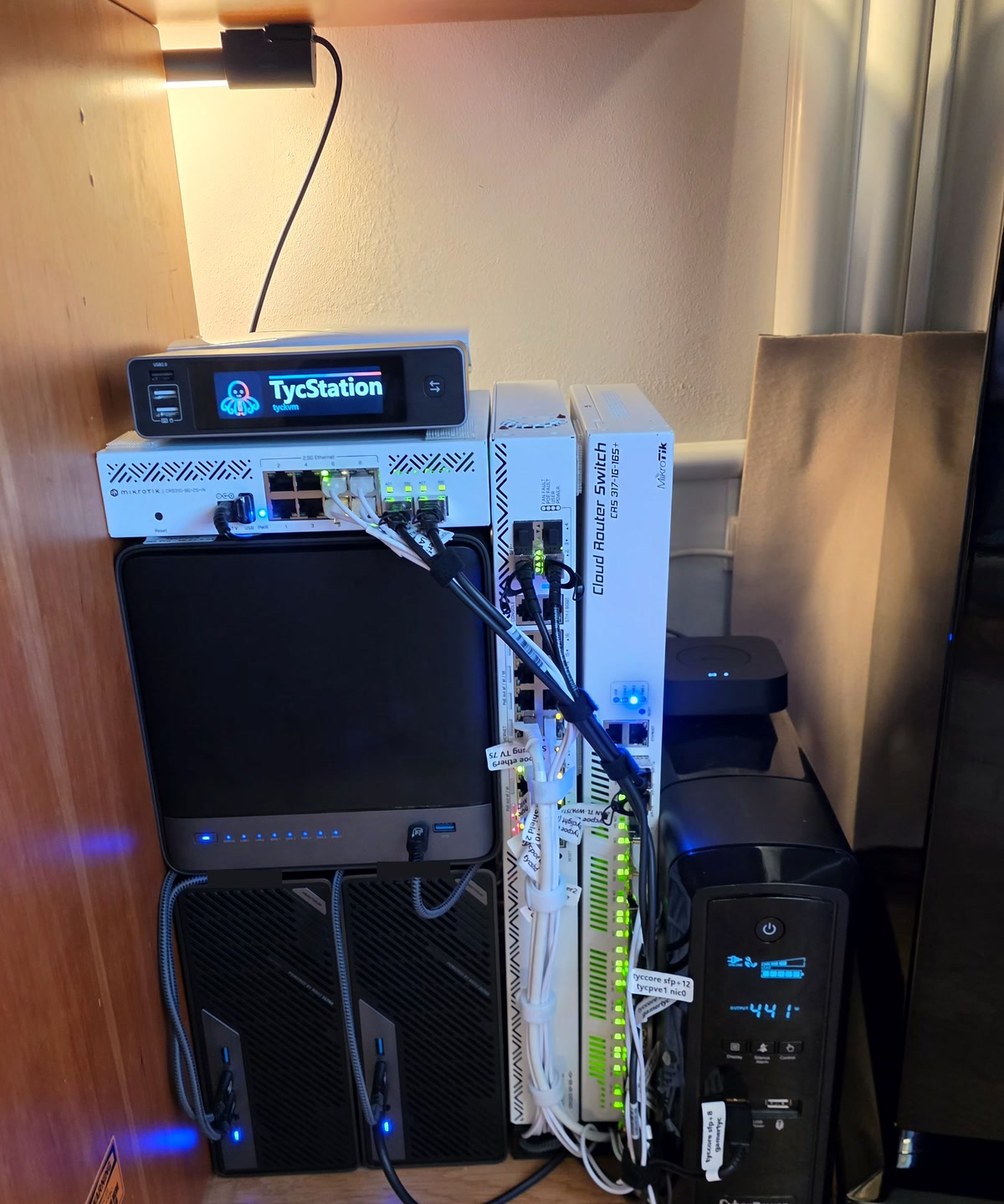 20 September 2026: the third node seated — it carries the access switch and the KVM, the two MS-02s stand beneath it — and the fabric re-plugged with a flag on every cable.
No noise figure: it was never measured, which is a gap in a build whose one hard constraint was noise. Power draw is metered continuously; per-device idle is not broken out.
The ports are the part worth staring at. Each MS-02 carries two 25G SFP28 ports in a 4.8-litre case. One of them actually runs at 25G — on a direct cable to the other node. The other is plugged into the core switch and runs at 10G, because the core switch is 10G. The fastest port in the fabric is the one that does not use the fabric. Faster still are the two USB4 cables at 80 and 40 Gb/s, though one core tops out near 17 Gbit/s, so the number on the box is not the number you get. Meanwhile the port facing the internet is a 2.5G NIC negotiating 1G, because a G.fast line is what is on the other end.
What runs where
Three Proxmox nodes carry the guests. The two MS-02s run most of them; the N5 Pro joined on 12 September and carries the backup server and camera detector. The Synology provides shared storage. Each MS-02 also has its own OPNsense VM, fixed to that node.

The cables and the machines they connect. The third node has no WAN connection.
The modem has a cable to each MS-02, with no switch in between. The node bonds carry the LAN trunks into the MikroTik switches, and the NAS has its own connections. The three nodes also form a USB4 triangle for the cluster’s standby heartbeat. Nodes 1 and 2 have a direct connection for firewall state sync, so those two functions do not depend on the core switch.
- Smart home — Home Assistant and its companions run in containers on a dedicated VM. Devices reach it over Zigbee, Thread, Matter and MQTT. Its voice assistant runs locally; the Amazon Echo speakers still depend on the cloud. The move from Home Assistant OS made it possible to pin and rebuild the services like the other containers.
- Media — Plex serves the household library from the NAS.
- Websites — Traefik routes this site and selected public services. Public ingress is IPv4 only, a decision made in September.
- Credentials — OpenBao holds the secrets and issues short-lived credentials to CI jobs.
- Monitoring — Grafana, Loki and Prometheus collect metrics and logs. Coverage is still incomplete.

How the household and visitors reach those services.

The services depend on the network and storage beneath them. The workload does not currently call for Kubernetes.
When a node stops
One failed gateway once took the apartment offline. There are now two OPNsense VMs, one on each MS-02. CARP moves the shared addresses between them, pfsync copies open connections, and DHCP runs in hot-standby mode. The firewall VMs stay on their own nodes; the surviving firewall takes over the service.
One firewall distributes configuration to its partner over OPNsense’s sync channel. Changes originate in git. Both members have the same CARP priority, so the current master keeps the role when its partner returns. A deliberate swap and swap-back on 23 August 2026 moved the master role and the dial-up session. The single DSL line still has to redial during failover.
The pair has also survived a pulled WAN cable, an accidental power-off of the node holding master, and a failed trunk member. Nobody timed those failures, so there is no measured recovery time for them.
Proxmox handles the other guests separately. Eleven are enrolled in HA. On 1 September, a planned reboot drained a node’s guests to its peer and brought them home afterwards. In the second test a node was crashed without warning; every enrolled guest was running on the survivor about two minutes later.
The third node gives the cluster three votes. It can lose one member and keep quorum. Losing two requires confirming the other nodes are down before using the documented emergency recovery procedure. The former tie-breaker has its own short-lived story.
Guests needed for recovery use local ZFS, replicated to both other nodes, so restoring access does not depend on the NAS. Other suitable VMs use shared NFS. Docker on NFS caused problems earlier and is one reason for keeping those storage choices explicit.
A failed core switch still isolates switched traffic. The direct heartbeat and firewall-sync links keep working, but they do not replace the LAN.
Eight network zones
The first segmentation scheme leaked at layer 2. Its replacement has eight routed zones, one VLAN per risk class, with traffic between them passing through the OPNsense pair. Each path is denied unless a rule allows it.

The zone rules are active; guests are moving to their new addresses.
Traefik sits in dmz, separated from the private services it publishes. A few documented NAS resilience ports are also exposed outside that zone. Plex shares the smart-home and AV zone with its playback devices. The other private zones separate trusted household machines, guests, and a segment belonging to someone else that gets internet access without access to the rest of the network. The restricted zones hold the secrets vault, management interfaces and cameras.
Internal addressing uses a private ULA /48. The ISP’s IPv6 prefix can change without changing the internal names or policy. Traffic within a zone is not filtered, and the trusted zone is broad. Isolation between individual workloads remains planned.
The MikroTik switches replaced consumer switches whose management conflicted with configuration from git and whose PoE capacity was insufficient. RouterOS can be configured from the pipeline, and the PoE switch supplies PoE++. The UniFi access point stayed for its radios.
Storage and recovery
Guest backups go to a dedicated backup server. They are encrypted on the source node, then deduplicated and periodically re-read by the server. Since 14 September its datastore has lived on the N5 Pro’s HDD pool. The Synology pulls a second copy every morning and cannot decrypt it.
One guest has been restored from that encrypted store. A recovery test covering the whole fleet remains outstanding. The archive key is held in OpenBao; a copy outside the fleet is also still needed, so the backups can be opened if the cluster and its vault are lost together.
The backup note covers the schedules, copies and the backup that stopped for thirteen days before anyone noticed.
How changes reach the machines
An infrastructure change starts in a branch. Its merge-request pipeline checks the configuration and produces a plan. After merge, a separate apply job runs on a runner in the LAN. It is triggered separately in GitLab.

Checks before apply, service checks afterwards.
OpenBao uses the job’s GitLab OIDC identity to issue a short-lived credential scoped to its repository. Merge-request jobs can plan and read state; the credentials that can change infrastructure are available only to apply jobs on the protected branch. This replaces stored, long-lived automation tokens.

Where the jobs run and which systems they change.
OpenTofu has five separate states: Proxmox, the switches, the firewall pair, DNS and the Wi-Fi controller. Each has its own lock. Independent changes can run in parallel, while changes to the same state run one at a time. Each firewall has a runner on its own node for its interfaces and WAN configuration. Shared CI templates provide the jobs; branch protection and credential scope restrict where applies can run.
Secret scans cover git history, and configuration scans check infrastructure definitions. Network verification checks eleven properties directly on the switches; another check reads the source configuration before apply. One limit: the checks reach the switches through the network they check, so a break in that network also hides the switch from them.
Scheduled comparisons catch configuration changed outside the pipeline and changes merged but never applied. A detected difference fails the relevant job.
Home Assistant fetches main itself; the
deployment note explains
how. Emergency infrastructure recovery
uses documented access outside CI when the runners cannot reach a broken
system.
The remaining move
Replacement guests run beside their predecessors until their workloads have moved. The switches, firewall pair and shared storage are in place. Existing nodes are updated one at a time, with their guests moved away first and the other firewall keeping the connection up. No physical node reinstall or rename is planned.

Old guests stay available until their replacements have been checked.
The remaining work includes completing those guest moves, measuring firewall failover, extending monitoring to the rest of the fleet, setting up the KVM, and testing recovery with a copy of the archive key held outside the fleet.
The September audit and its limitations are covered in 45 of 132.